This Site
Published in Articles , last modified
This site is generated as a static site with the Debian stable package of Pelican. I created my own custom theme for it with Bootstrap 5.
My First Steps with Pelican
I started with the Quickstart tutorial and played with the minimal site you generate there. Not having defined a theme, the pure html output was pretty bare:
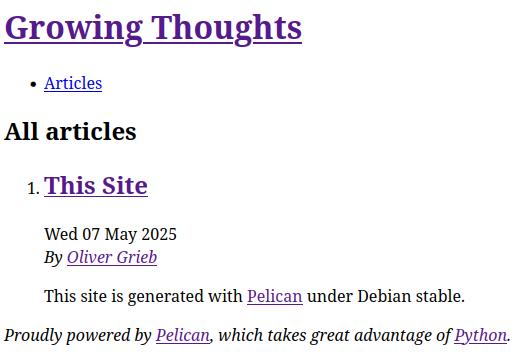
The Quickstart tutorial shows the steps to generate and preview a site once. If you start playing around with articles and Markdown and such you probably don't want to run the
pelican content
pelican --listen
commands every time. The make devserver command is much handier. It will re-generate and re-serve the site on http://127.0.0.1:8000 with every file change.
Next, I looked through the Pelican included themes, but nothing really jumped out at me... So I got curious about customizing my own theme.
Adding a Custom Theme
The Pelican docs suggest to build your own theme with their simple theme. To add the theme to your site download the simple theme's folder from the GitHub repository into a subfolder, e.g., your-site/theme/.
To enable the theme in your builds add the below setting to your pelicanconf.py. It takes the relative path to the theme's subfolder.
THEME = 'theme/'
The simple theme (folder) only contains a templates/ subfolder with .html files. These define a blog structure. All Pelican themes do. Were you now to build your project site again, it would still look very bare. Similar to the screenshot above. As the simple theme doesn't include any CSS.
I didn't have any CSS experience, but have heard a lot about Bootstrap. So, I tried to figure out how to add that to my new theme.
Adding Bootstrap
Bootstrap provides downloadable, ready to use compiled code bundles. These contain css and js code. As I am only interested in a simple, static blog, I prefer to use only the minified css part.
To add it, copy the bootstrap-5.3.5-dist/css/bootstrap.min.css file from the downloaded zip file and save it in the theme/static/css/ folder.
The simple theme comes with a stylesheet URL in the <head> section of the base.html file:
{% if STYLESHEET_URL %}
    <link rel="stylesheet" type="text/css" href="{{ STYLESHEET_URL }}" />
{% endif %}
But, for my little page I don't need it to be loaded from a CDN. Pelican supports a CSS_FILE setting, but it isn't used by the simple theme. I added it to my theme by replacing above block with
<link rel="stylesheet" type="text/css"
      href="{{ SITEURL }}/{{ THEME_STATIC_DIR }}/{{ CSS_FILE }}" />
the CSS_FILE setting is provided in the pelicanconf.py file as
CSS_FILE = 'css/bootstrap.min.css'
Theme Changes
bla
<html lang="{% block html_lang %}{{ DEFAULT_LANG }}{% endblock html_lang %}"
      data-bs-theme="dark">
Makefile Patch
I patched the rsync command in the Pelican generated Makefile to --exclude 'logs' to avoid warnings with rsync and my webhost. My webhost keeps a logs directory in its document root that rsync tries to delete.
rsync_upload: publish
-   rsync -e "ssh -p $(SSH_PORT)" -P -rvzc --include tags --cvs-exclude --delete "$(OUTPUTDIR)"/ "$(SSH_USER)@$(SSH_HOST):$(SSH_TARGET_DIR)"
+   rsync -e "ssh -p $(SSH_PORT)" -P -rvzc --include tags --cvs-exclude --delete "$(OUTPUTDIR)"/ --exclude 'logs' "$(SSH_USER)@$(SSH_HOST):$(SSH_TARGET_DIR)"